Best for creators selling digital products and paid newsletters
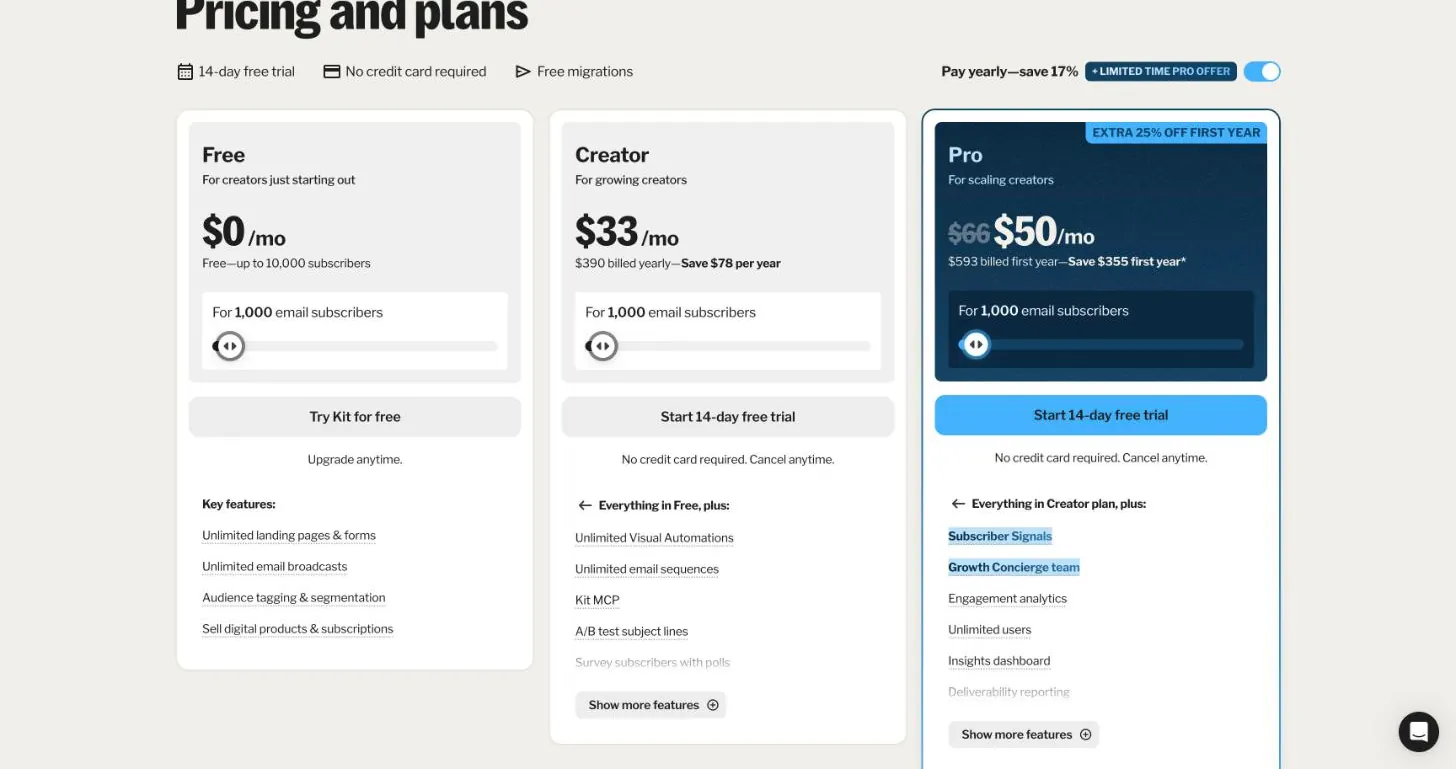
Free up to 10,000 subs; paid from $33/mo (Creator)
Visit Kitbeehiiv vs Kit for developers: who can publish via API, webhook delivery and limits, custom domains, data export, and cost at 1k, 10k and 50k.

Best for creators selling digital products and paid newsletters
Free up to 10,000 subs; paid from $33/mo (Creator)
Visit KitBest for growing a paid or ad-supported newsletter
Free up to 2,500 subs; paid from $59/mo (Lite)
Visit beehiivScroll sideways to see all 9 columns →
| Tool | Pricing | Free plan | Paid from | Price at 10k subs | Paid subscriptions | Automations | API | Custom domain | Link |
|---|---|---|---|---|---|---|---|---|---|
 KitCreators selling digital products and paid newsletters KitCreators selling digital products and paid newsletters | Free up to 10,000 subs; paid from $33/mo (Creator) | Up to 10,000 subs | $33/mo | $0 (Free: no automations or API) | Paid plans | Visit | |||
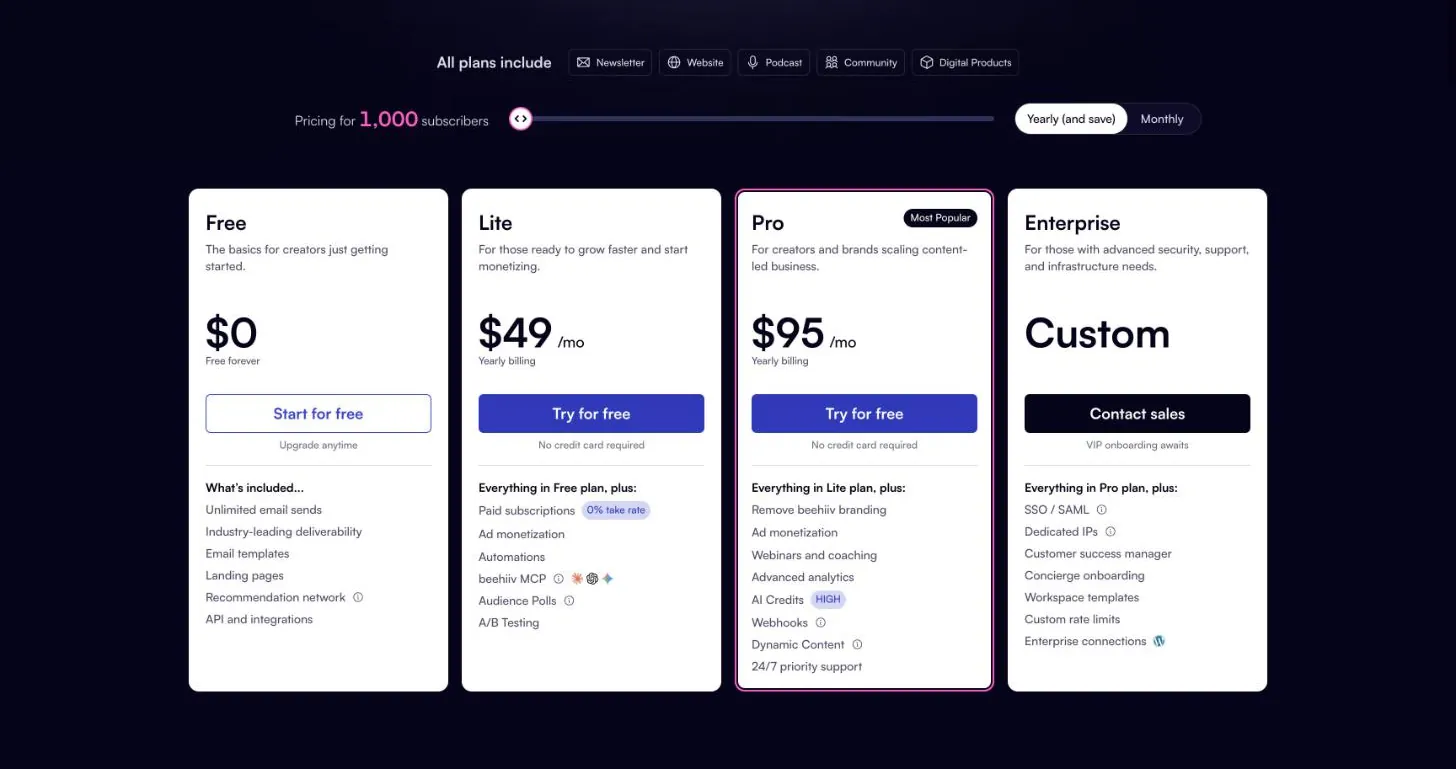
 beehiivGrowing a paid or ad-supported newsletter beehiivGrowing a paid or ad-supported newsletter | Free up to 2,500 subs; paid from $59/mo (Lite) | Up to 2,500 subs | $59/mo | $139/mo (Lite) | Paid plans | Visit |
If you want to create and schedule newsletter issues from your own code (a build step, a CMS hook, a cron job), Kit gets you there for less money: its V4 API can draft and schedule broadcasts, while beehiiv only lets you create posts by API on Pro, which starts at $109/mo. If you want a hosted, Substack-style publication with a 0% cut of paid subscriptions and you mostly need the API for subscriber sync, beehiiv is the better fit.
The rest of this page covers the details that decide it for developers: which plan unlocks which endpoint, how webhooks behave, rate limits, export, and what you pay as the list grows.
We haven’t run a production newsletter on either tool. This comparison comes from each vendor’s pricing page and developer documentation, read on 2026-10-12 and linked in the sources. We focused on what a developer wires up: API access by plan, post creation, webhooks, rate limits, custom domains, export, and price at 1,000, 10,000 and 50,000 subscribers. Where a vendor page contradicts itself or leaves something out, we say so instead of guessing.
beehiiv. According to the pricing page, every plan, Free included, has API access, but the Send API is only on Pro and Enterprise. The Create post endpoint says outright that it “is available to publications on the Pro and Enterprise plans.” Post creation is asynchronous: you get a 201 with a stable post id, and a fetch right afterwards can return 202 until the post exists. You can send structured blocks or raw HTML in body_content, but <style> and <link> tags are stripped, so only inline styles survive. If you render issues from Markdown in your own pipeline, plan for that.
Rate limits are per plan and per credential: 30 requests/minute on Free, 180 on Lite, 500 on Pro, 800 on Enterprise. Auth is a bearer API key, and beehiiv also supports OAuth2 for integrations.
Kit. The V4 API supports API keys for your own account and OAuth 2.0 (refresh-token and PKCE flows) for apps. Create a broadcast lets you save a draft (send_at: null), publish to the web (public: true), or schedule a send, targeting segments or tags. Rate limits depend on auth, not plan: 120 requests per rolling 60 seconds with an API key, 600 with OAuth. The bulk endpoints (bulk subscriber create, bulk tagging) need OAuth.
One catch on Kit Free. Kit’s pricing page shows a checkmark for “Get access to Kit’s API” on the Free plan. Kit’s developer docs say otherwise: the response-code page lists “being on a free account” as a cause of 401, and the webhooks error page says a free plan gets 401 on webhook endpoints. Budget for a paid plan if the API is the reason you’re choosing Kit.
| beehiiv | Kit | |
|---|---|---|
| Which plans | Lite and up (3 on Lite, unlimited on Pro) | Paid plans (docs say free accounts get 401) |
| Signing | Delivered through Svix, verify the svix-signature header |
HMAC-SHA256 in X-Kit-Signature, with live secret rotation |
| Retries | Not stated in the webhooks overview | 8 attempts over about 41 hours |
| Batching | Not stated | Up to 100 events of one type per delivery |
| Events | Subscription created/confirmed/deleted/upgraded/downgraded/paused, post sent/updated/scheduled, survey responses, podcast events | Subscriber created/activated/unsubscribed/bounced/complained, tag and form events, sequence events, broadcast created/sent/deleted, post.published |
| Manage via API | POST /webhooks |
/v4/webhook_endpoints |
Two practical notes. On beehiiv Lite, three webhooks goes quickly if you want separate endpoints per environment (prod, staging, a Zapier test). On Kit, build on /v4/webhook_endpoints and not the older /v4/webhooks: Kit’s docs say the legacy webhooks drop failed deliveries and don’t sign payloads. Kit also lists some events (subscriber.link_clicked, subscriber.email_opened, subscriber.product_purchased) as planned but not yet subscribable. The API rejects them with a 422 today.
beehiiv’s pricing page lists custom web domains on Lite, Pro and Enterprise. It contradicts itself on Free: one feature list includes “Custom Domains” while the comparison tables mark them as not included. Treat it as a paid feature unless beehiiv confirms otherwise for your account.
Kit’s pricing page says you can “customize your free Kit domain or connect your own custom domain” for landing pages, and shows that as included on Free and Creator. A custom link-tracking domain is a Pro-only feature.
beehiiv exports subscribers in a basic version (email, status, tier) or a full one (adds custom fields and stats), and exports all posts (published, archived, draft) as CSV. Download links expire after 24 hours. There is a Subscription Export API endpoint, but it covers subscribers only and is a gated feature you have to ask beehiiv to enable.
Kit’s help center covers subscriber export: first name, email, created date, status, tags, location, attribution data and custom fields, with download links that last five days. Remember to click “Select all” or you only export the current page. The export article doesn’t mention exporting broadcasts or posts, so if you need your archive portable, keep the source content in your own repo and treat Kit as the sender. That’s a reasonable pattern with either tool.
Prices are from the vendor pricing pages on 2026-10-12, in USD.
| Subscribers | beehiiv Lite (monthly / annual) | beehiiv Pro (monthly / annual) | Kit Free | Kit Creator | Kit Pro |
|---|---|---|---|---|---|
| 1,000 | $59 / $49 per mo | $109 / $95 per mo | $0 | $33/mo ($390 billed yearly) | $50/mo promo, normally $66 ($593 first year) |
| 10,000 | $139 / $119 per mo | $239 / $199 per mo | $0 (cap is 10,000) | Not published | Not published |
| 50,000 | $299 / $249 per mo | $469 / $399 per mo | Not available | Not published | Not published |
beehiiv Free costs $0 up to 2,500 subscribers, with API access at 30 requests/minute but no webhooks and no Send API.
Kit’s pricing page only shows paid prices for the 1,000-subscriber tier, so we can’t give you a verified Creator or Pro figure at 10k or 50k. Get a quote from Kit’s pricing slider or sales before you commit. Kit Free reaching 10,000 subscribers looks like a big saving, but Free has no visual automations, and per the developer docs no API or webhooks, so for a developer integration it isn’t really comparable.
What a developer setup actually costs at 1,000 subscribers:
Best for creators selling digital products and paid newsletters
Pricing: Free up to 10,000 subs; paid from $33/mo (Creator)
What we like
Watch out for
Pick Kit if your newsletter is driven by your own code: you write issues in your repo, generate them in CI, and want to draft or schedule them through the API without paying for a top tier. Its webhook system is the more developer-friendly of the two (HMAC signatures, secret rotation, retries for about 41 hours, batched deliveries), and API-key rate limits don’t depend on plan. Skip it if you need verified pricing above 1,000 subscribers before you start, or you want posts exported as easily as subscribers.
Best for growing a paid or ad-supported newsletter
Pricing: Free up to 2,500 subs; paid from $59/mo (Lite)
What we like
Watch out for
Pick beehiiv if you want a hosted publication with a web archive, a 0% cut of paid subscriptions, and transparent pricing all the way to 50,000+ subscribers. The free tier is also more useful for prototyping an integration: 2,500 subscribers and read/write API access at 30 requests/minute, no card needed. Skip it if API-driven publishing is a must and $109/mo is too much at your size, or if three webhooks on Lite won’t cover your environments.
git push to publish an issue: Kit (Creator or above). On beehiiv this requires Pro.401 from the API.Does beehiiv have an API on the free plan? Yes. The pricing page lists API access on Free, excluding the Send API, at 30 requests per minute. Webhooks start on Lite, and creating posts by API needs Pro.
Can I send or schedule a Kit broadcast through the API?
Yes. POST /v4/broadcasts creates a draft, a web-published post, or a scheduled send targeted by segment or tag. Your account needs a plan that includes API access. Kit’s docs say free accounts get 401.
How do beehiiv and Kit webhooks verify signatures?
beehiiv sends webhooks through Svix, so you verify the svix-id, svix-timestamp and svix-signature headers with your endpoint’s secret. Kit signs deliveries with HMAC-SHA256 in the X-Kit-Signature header.
Can I export my posts from beehiiv or Kit? beehiiv exports all posts as CSV from Settings, alongside subscriber exports. Kit’s help center documents subscriber export only, so keep your own copy of issue content if portability matters.
 Email & newsletters
Kit, MailerLite, beehiiv, GetResponse and ActiveCampaign APIs compared on what matters to developers: sending, webhooks, rate limits and plan gates.
Updated Oct 13, 2026
 Email & newsletters
What Kit, systeme.io, GetResponse, MailerLite and beehiiv cost at 1k, 5k, 10k and 25k subscribers, and what you give up at each price.
Updated Oct 12, 2026
 Email & newsletters
Leaving Substack for a real API and your own domain? Four alternatives compared on API access, migration of posts and paid subscribers, and the 10% break-even.
Updated Oct 12, 2026